As Lead UX/UI Designer, I designed a proof of concept for a responsive web app that transforms pharmaceutical product documentation from static PDFs to a dynamic, database-driven interface serving two distinct audiences: healthcare providers and patients, and to secure approval for global deployment across multiple markets.
This project, which is covered by a Non-Disclosure Agreement (NDA), restricts the sharing of detailed information and visuals. However, I can share an overview of my contributions, design approach, and the project's impact.
Role: Lead UX/UI Designer
Company: Global Pharmaceutical Organization
Industry: Healthcare & Pharmaceutical
Enterprise Scale & Complexity
The system needed to serve healthcare providers requiring clinical precision and patients needing plain-language accessibility—two fundamentally different audiences accessing pharmaceutical product documentation. The application had to integrate with a CMS housing over 1,000 documents across medications and healthcare accessories while maintaining FDA regulatory compliance and allowing content administrators to edit documentation without disrupting workflows.
Impact at a Glance
Business Results
Enabled stakeholders to present compelling demos to leadership
Proved technical feasibility with functional POC demo
Design work supported successful funding approval request
50% reduction in stakeholder alignment cycles
User Validation
100% task completion rate in usability testing
82/100 System Usability Scale score
4.2/5 average satisfaction rating
Strong NPS indicating recommendation likelihood
Design Leadership
Designed dual-audience content strategy
Led bi-weekly syncs with engineers/architects
Contributed accordion variant to design system
Documented future roadmap for Phase 2
The Challenge
The existing PDF-based approach created friction for both audiences. Healthcare providers couldn't find clinical information quickly during patient care, while patients struggled to understand complex medical terminology. The same content needed to serve users with vastly different needs and comprehension levels.
For Users
Finding specific information in 50+ page PDFs required extensive scrolling
Mobile access was difficult, with 40% of providers using phones during patient rounds.
Providers needed clinical precision while patients needed plain language.
No direct navigation to relevant sections or search functionality
For Business
Over 1,000 documents need a scalable solution, not a one-time design.
The CMS structure couldn't be changed; the solution had to work within constraints.
FDA regulatory requirements for content presentation
Uncertain hosting platform; requires adaptable design.
Pain Point Identified Through Stakeholder
Workshops
"Finding specific information in a 50-page PDF requires extensive scrolling and searching. Users need to download, scroll through the entire document, and hope they find the right section."
My Role & Approach
As Lead UX/UI Designer, I was responsible for the design strategy while working closely with engineers to address backend complexity simultaneously. I concentrated on an iterative design process with ongoing user feedback, making sure solutions were both technically viable and truly intuitive, despite a tight 12-week deadline.
My responsibilities included:
With over 1,000 documents in the CMS and complex backend architecture being addressed simultaneously, I concentrated on the presentation layer: interface design, user experience, responsive behavior, and interaction patterns. Instead of waiting for ideal backend conditions, I created solutions that fit existing constraints while championing users through iterative testing and strategic scoping.
Design Strategy & Execution:
Designed complete user flows, information architecture, and interaction patterns for both healthcare providers and patients.
Created comprehensive specifications for responsive data visualization, document-like search functionality, and anchored navigation that worked within CMS constraints.
Cross-Functional Collaboration:
Led bi-weekly syncs with developers and IT architects to validate technical feasibility, understand database limitations, and adjust designs based on real-world constraints.
Collaborated with the design system team to contribute an accordion variant for multi-section clinical reference scenarios.
Research & Validation:
Conducted stakeholder workshops to understand business requirements and user needs.
Performed competitive analysis of pharmaceutical information systems and clinical tools.
Applied heuristic evaluation using healthcare usability principles. Due to timeline constraints, validated core usability with internal designers as patient-audience proxies using standardized metrics (SUS, satisfaction ratings, NPS).
Achieved 100% task completion rate and identified critical improvements like increasing search highlight contrast from 3:1 to 7:1 for better visibility.
Constraints
As I designed, I identified features that would significantly improve the experience, such as advanced filtering, cross-product comparison, and personalized content. Still, I recognized that these exceeded the scope of the POC.
By clearly separating "prove the concept" from "optimize the experience," I provided stakeholders with a functional demo that secured Phase 2 funding, where the full vision could be realized.
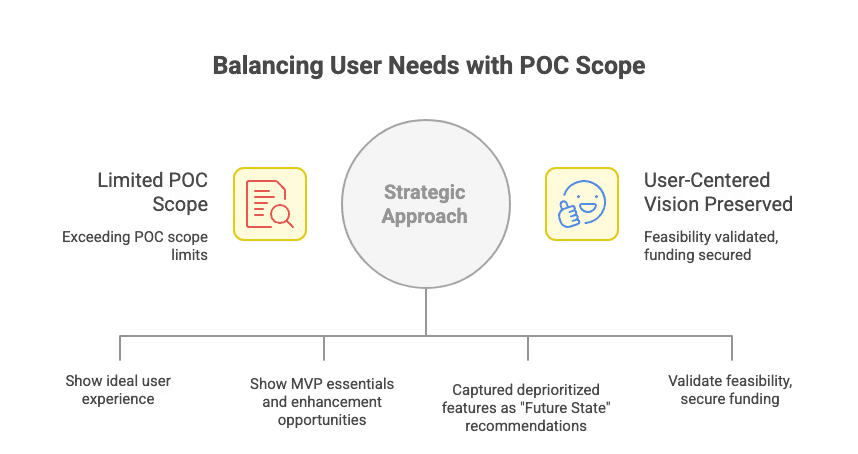
My strategic approach by balancing user needs with POC scope
Design Process
Discovery & Define
I conducted stakeholder workshops, competitive analysis, and heuristic evaluations to fully understand the scope: over 1,000 documents in the CMS, two distinct audiences with different needs, CMS editing processes that couldn't be disrupted, and parallel backend architecture efforts.
Research Approach: Given the 12-week timeline, I used multiple research methods to inform design decisions.
Stakeholder Workshops: Gathered requirements and understood business constraints from PM, IT leaders, and content administrators
Competitive Analysis: Analyzed FDA.gov, clinical decision support tools, and pharmaceutical information databases for best practices
Heuristic Evaluation: Applied UX principles and healthcare usability guidelines to inform information architecture and interaction design
Technical Discovery: Worked with IT architects to understand database constraints, query performance, and platform limitations
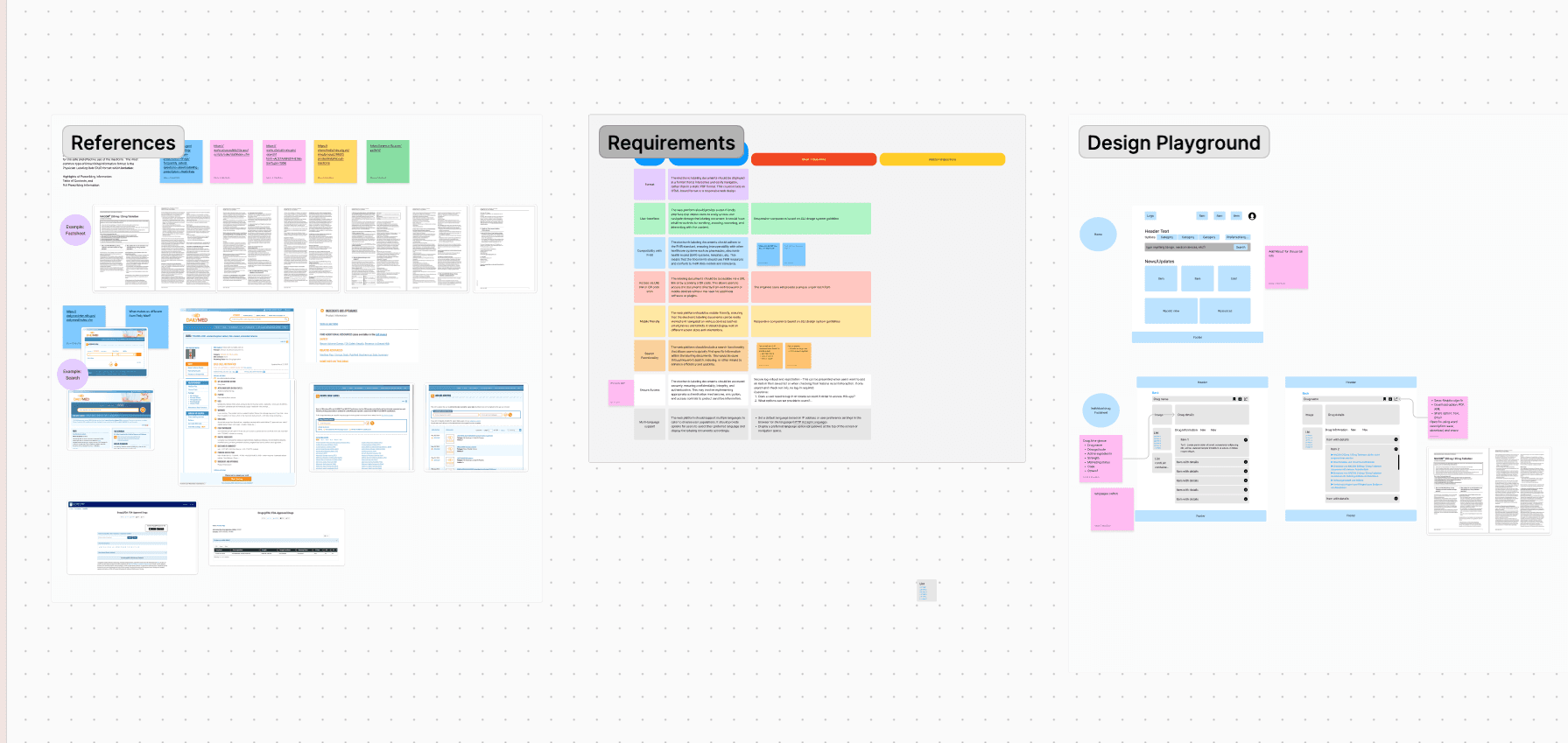
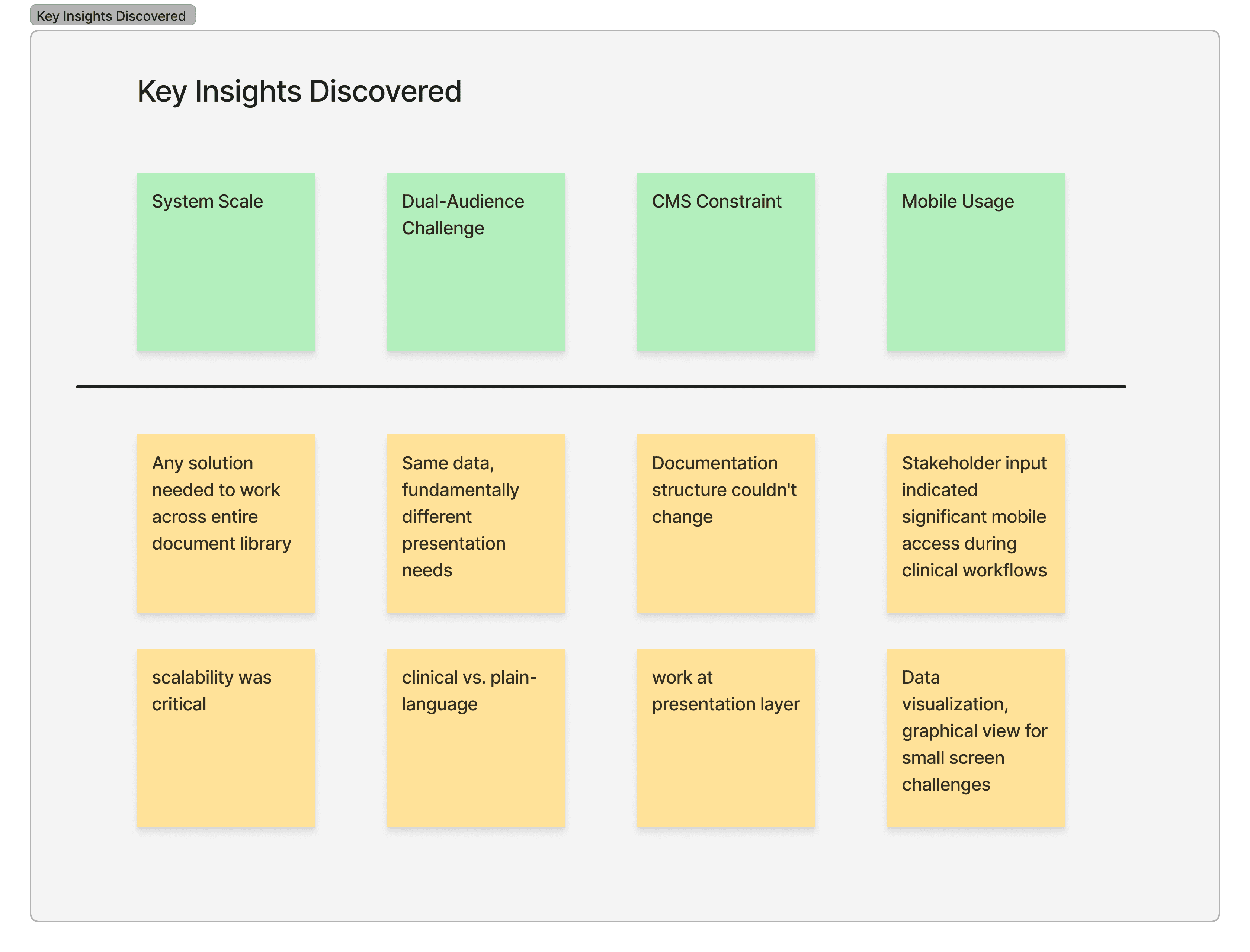
Discovery - Design workshops
Design Iteration & Development
I designed a search feature that mimics Word/PDF Ctrl+F behavior familiar to healthcare providers, plus options for sharing and downloading to support real workflows.
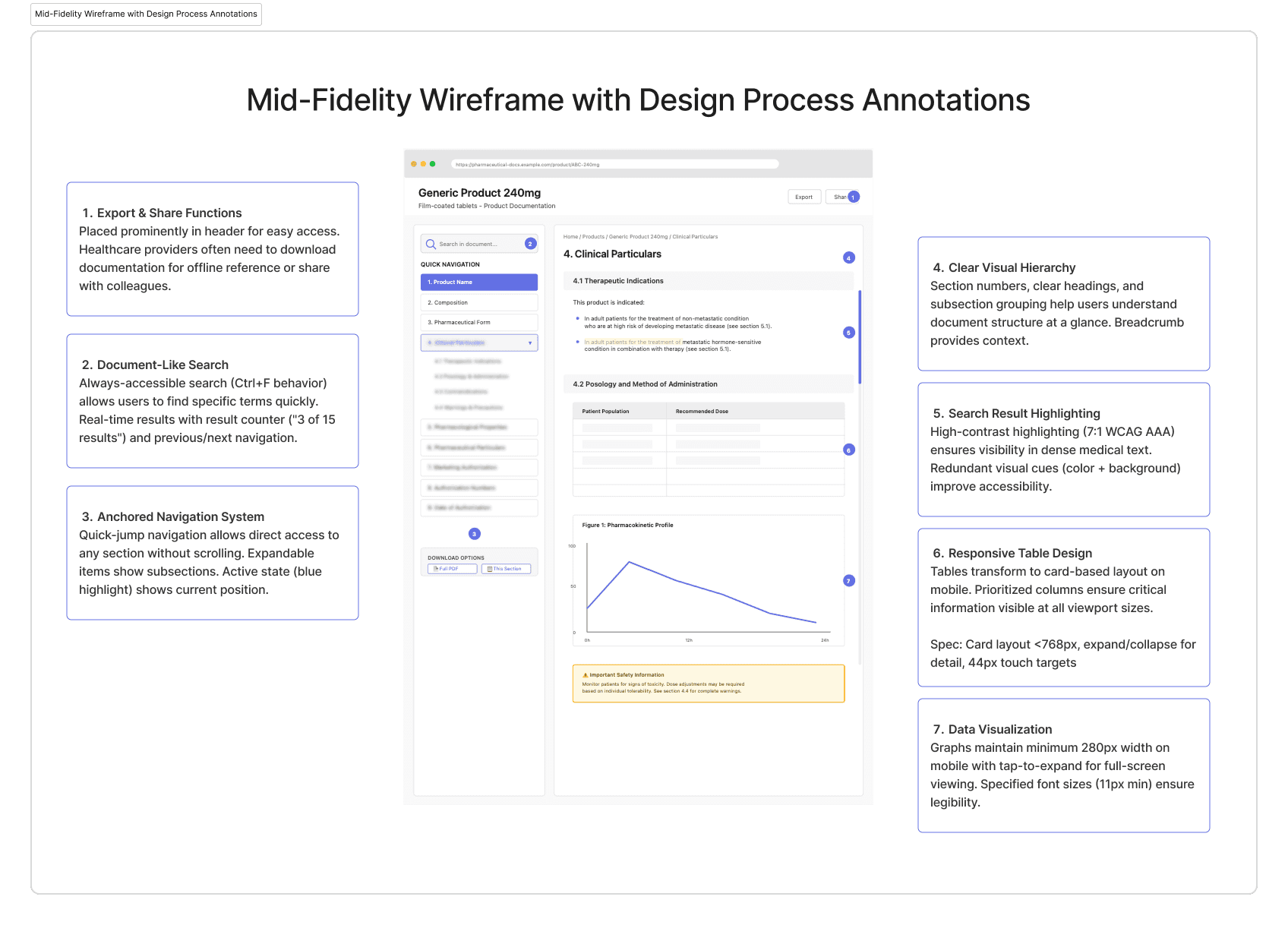
Desktop View: Anchored Navigation + Content Display with Design Process Annotations
Validation With Internal Users
Due to the 12-week timeline constraints, I conducted usability testing with internal designers who served as proxies for the patient audience, evaluating the interface's intuitiveness, information findability, and overall usability through task-based scenarios.
Testing Approach:
Participants: Internal designers (as patient-audience proxies) who were unfamiliar with the project
Method: Task-based usability testing with scenarios simulating information-seeking behaviors
Rationale: Timeline didn't allow for HCP recruitment, but internal designers could validate core usability, navigation intuitiveness, and information architecture effectiveness
User Validation Results:
100% task completion rate in usability testing
82/100 System Usability Scale score
4.2/5 average satisfaction rating
Strong NPS indicating recommendation likelihood
The Solution
We delivered a working proof of concept for a larger global rollout, showcasing a responsive web application with real-time database integration, dual-audience content strategy, and intuitive navigation, all functioning within existing CMS constraints.
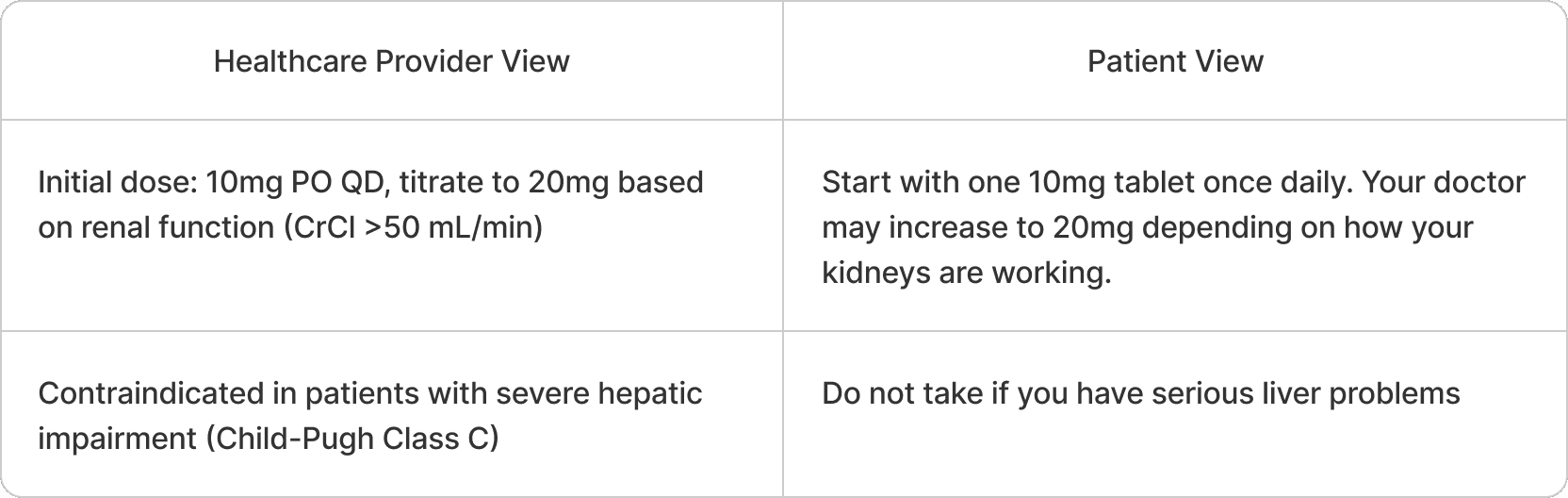
Example: Dual-Audience Design
Anchored Navigation Within CMS Constraints
Since I couldn't reorganize database content, I created an anchored navigation system that lets users jump directly to the sections they need, fixing findability issues without restructuring the CMS.
Dual-Audience Design
I designed a dual-view architecture that presents the same pharmaceutical data through two different interfaces, optimized for each audience's understanding. Patients can access information that is easy to digest, like a leaflet, but with limited scientific terminology.
Responsive Specs for Complex Content
Pharmaceutical documentation includes tables, graphs, and medical images. I developed comprehensive specifications to ensure they stay usable on small screens.
Search & Sharing Features
I created a search feature that mimics Word/PDF Ctrl+F behavior familiar to healthcare providers, along with options for sharing and downloading for real workflows.
Project Impact & Results
Business Outcomes:
Enabled Stakeholder Presentation: Design work provided stakeholders with compelling demos and materials to present to larger leadership groups for funding approval
Supported Funding Request: Functional POC and comprehensive documentation helped stakeholders make a strong case for Phase 2 investment in worldwide deployment
Proved Technical Feasibility: Real-time database integration and multi-database architecture validated the concept was buildable
Clear Roadmap Established: Documented future state features informed by user research provided clear path forward for Phase 2
Stakeholder Alignment: Bi-weekly demos with working prototypes reduced debate cycles by 50%
User Impact:
Validated Core Usability: Proxy user testing confirmed navigation patterns and information architecture were intuitive
100% Task Completion: Core workflows were learnable without training, validated fundamental interaction design
Strong Usability Metrics: SUS score of 82/100 and 4.2/5 satisfaction indicated solid foundation for further development
Clear Phase 2 Priorities: Testing insights identified which features to validate with actual healthcare providers and patients
"Appreciate this app is not overcrowded. Easy to search through the content and less distracted thing.."
What Drove Our Success
Iterative Design Validates Feasibility - Working through multiple fidelity levels with continuous user testing and technical validation ensured solutions were both buildable and usable, even in a compressed 12-week timeline.
Design Systems Enable Speed and Quality - Using accessibility-tested component libraries made delivery faster and safer. Sharing improvements back showcased authentic design leadership that goes beyond just the project.
User Advocacy Includes Strategic Scoping - Designing the complete vision and working with stakeholders to distinguish what proves the concept from what gets roadmapped. It's understanding that a focused POC enables future investment.
Continuous Validation Prevents Waste - Testing concepts with users and validating feasibility with engineers throughout the process prevented investing time in solutions that won't work or won't be used.
What I'd Optimize Next Time
Earlier User Involvement - While stakeholder alignment was valuable, direct user feedback in weeks 2-3 would have reduced iteration cycles. Allocate time for lightweight user validation even with tight timelines.
Accessibility at Each Phase - Some improvements (like search highlight contrast) required late-stage rework. WCAG compliance checks should happen at each design phase, not primarily during testing.
Understand Further Global Users - As the team moves forward, the focus will be to understand further global users by facilitating user testing sessions across regions and collecting diverse perspectives by asking participants to navigate the app and rate their experience.
Let's Work Together
Contact
© Created by Mara Suwannawat. 2025